
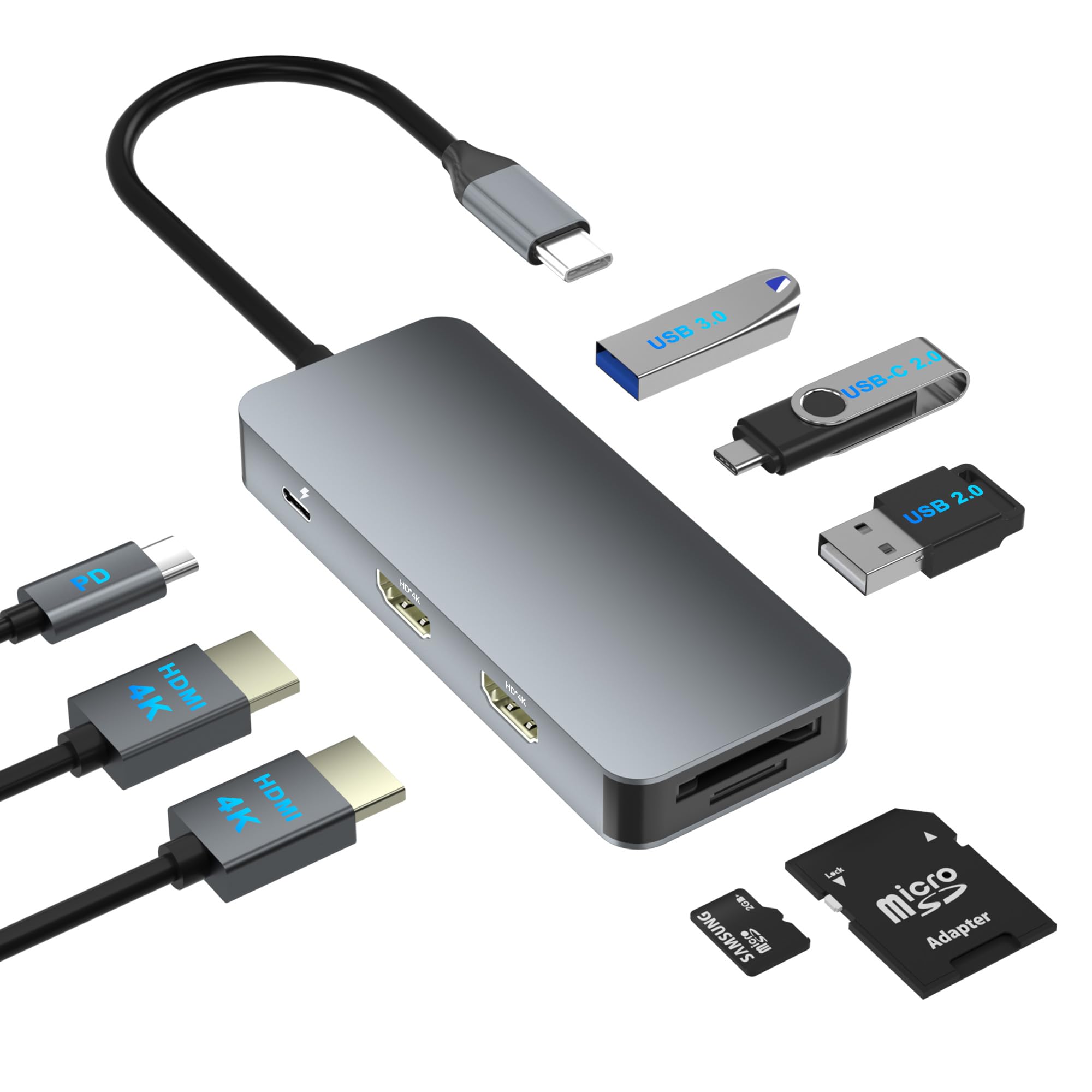
A Windows docking station for dual monitors is one of the most valuable accessories for professionals, students, gamers, and remote workers who need a more productive desktop setup. Modern laptops are lightweight and portable, but they often come with limited ports and may not support multiple displays without additional hardware. A docking station solves these limitations by expanding connectivity while allowing users to connect two external monitors, USB devices, Ethernet, audio equipment, and more through a single connection.
Choosing the right Windows docking station for dual monitors can significantly improve your workflow, reduce cable clutter, and make your workstation much more efficient. However, not all docking stations offer the same features. Understanding what to look for before making a purchase ensures you invest in a solution that meets your current and future needs.
Dual Monitor Support
The most important feature of any Windows docking station for dual monitors is reliable support for two external displays. A quality docking station should easily extend your desktop across two monitors instead of merely mirroring the same screen.
Check the maximum supported resolution and refresh rate. Many modern docking stations support dual Full HD displays, while premium models offer dual 4K monitor support for users who need sharper images and additional screen space.
Professionals working with spreadsheets, programming, graphic design, video editing, or multitasking benefit greatly from dual-monitor functionality.
Compatibility with Windows Devices
Compatibility should always be a top priority. A Windows docking station for dual monitors should work seamlessly with a wide variety of Windows laptops and desktops.
Before purchasing, verify compatibility with your laptop’s USB-C, Thunderbolt, or USB-A connection. Some docking stations are optimized for specific manufacturers, while others offer universal compatibility across multiple Windows devices.
Choosing a compatible docking station helps avoid driver issues and ensures smooth performance.
Multiple Video Output Options
Different monitors use different connection types. A quality Windows docking station for dual monitors should include multiple display outputs such as:
- HDMI
- DisplayPort
- USB-C Display Output
- VGA (for older monitors)
Having multiple output choices increases flexibility and allows users to connect both newer and legacy displays without additional adapters.
High Display Resolution Support
Display resolution directly affects image clarity and workspace quality. When selecting a Windows docking station for dual monitors, pay close attention to supported resolutions.
Depending on your requirements, look for support such as:
- Dual 1080p monitors
- Dual 1440p monitors
- Dual 4K displays
- High refresh rates for smoother visuals
Creative professionals and content creators especially benefit from higher-resolution monitor support.
Fast Data Transfer Speeds
A docking station is more than just a monitor hub. It also connects storage devices, flash drives, printers, and accessories.
A premium Windows docking station for dual monitors should include high-speed USB ports capable of transferring files quickly.
USB 3.2 and USB-C ports offer significantly faster transfer speeds than older USB standards, making backups and large file transfers much more efficient.
Plenty of USB Ports
Modern workstations use multiple accessories simultaneously. An ideal Windows docking station for dual monitors should provide enough USB ports for:
- Keyboard
- Mouse
- External hard drives
- USB microphones
- Webcams
- Flash drives
- Charging cables
Having numerous USB connections reduces the need for separate USB hubs and keeps your desk organized.
Ethernet Connectivity
Although Wi-Fi has improved dramatically, wired internet connections remain the preferred choice for many professionals.
A Windows docking station for dual monitors with a Gigabit Ethernet port provides:
- Faster internet speeds
- Stable video conferencing
- Reduced latency
- Reliable large file transfers
- Better online gaming performance
For offices and remote workers, Ethernet connectivity remains an essential feature.
Power Delivery Capability
Many USB-C docking stations support laptop charging through the same cable used for data and display connections.
Power Delivery allows a Windows docking station for dual monitors to charge compatible laptops while simultaneously connecting all peripherals.
This feature minimizes cable clutter and makes docking and undocking much quicker throughout the day.
Audio Support
Many users connect headphones, speakers, or microphones to their workstation.
A good Windows docking station for dual monitors should include audio input and output ports that support:
- Headphones
- External speakers
- Conference microphones
- Headsets
Integrated audio ports simplify workstation setup and reduce reliance on laptop connections.
Compact and Durable Design
The physical build quality matters, especially if the docking station will be used daily.
Look for a Windows docking station for dual monitors that features:
- Durable construction
- Efficient heat dissipation
- Compact footprint
- Professional appearance
- Stable placement on the desk
A well-built docking station offers better long-term reliability.
Easy Plug-and-Play Installation
Nobody wants to spend hours installing complicated software.
Many modern Windows docking station for dual monitors solutions offer plug-and-play functionality, allowing users to connect their devices with minimal setup.
Simple installation reduces downtime and helps users become productive immediately.
Wide Peripheral Support
Beyond displays, a docking station should support numerous office devices simultaneously.
A versatile Windows docking station for dual monitors should work well with:
- External SSDs
- Memory card readers
- USB printers
- Graphic tablets
- Webcams
- External keyboards
- Wireless mouse receivers
Broad peripheral compatibility enhances overall productivity.
Stable Performance Under Heavy Workloads
Business professionals often keep dozens of applications open while using two monitors.
A dependable Windows docking station for dual monitors should maintain stable performance during demanding workloads without disconnecting displays or slowing connected devices.
Reliable hardware ensures uninterrupted productivity throughout the workday.
Security Features
Some enterprise-focused docking stations include advanced security capabilities such as:
- MAC address pass-through
- PXE boot support
- Wake-on-LAN
- Secure firmware updates
These features are especially valuable for business environments where IT departments manage multiple workstations.
If you work in a corporate setting, choosing a Windows docking station for dual monitors with enterprise features can simplify device management.
Future-Proof Connectivity
Technology evolves quickly, making future compatibility an important consideration.
A forward-looking Windows docking station for dual monitors should support newer connection standards, allowing it to remain useful even after upgrading your laptop or monitors.
Choosing modern connectivity options extends the lifespan of your investment.
Effective Cable Management
One overlooked advantage of docking stations is cleaner cable organization.
Instead of connecting multiple cables every day, a Windows docking station for dual monitors consolidates everything into one central hub.
This results in:
- Cleaner desks
- Faster laptop connection
- Easier workstation maintenance
- Improved workspace aesthetics
Good cable management also reduces wear on laptop ports.
Reliability for Remote Work
Hybrid and remote work have increased the demand for organized home offices.
A dependable Windows docking station for dual monitors allows remote professionals to create a workstation that closely resembles a traditional office environment.
With dual displays, wired internet, USB accessories, and charging capabilities available through one dock, users can transition between office and home with minimal effort.
Value for Long-Term Productivity
While budget is always important, purchasing solely based on price may result in missing essential features.
A high-quality Windows docking station for dual monitors often provides better long-term value through improved reliability, broader compatibility, higher display support, and better overall performance.
Considering both present and future needs helps maximize your investment.
Conclusion
Selecting the right Windows docking station for dual monitors involves much more than simply adding extra ports. The best docking stations combine reliable dual-display support, fast data transfer, multiple USB connections, Ethernet, power delivery, audio support, and excellent compatibility with Windows laptops.
Whether you work from home, manage business tasks, create digital content, or simply want a cleaner and more efficient workspace, investing in a feature-rich Windows docking station for dual monitors can dramatically improve productivity. By focusing on compatibility, display performance, connectivity, durability, and future-proof features, you can build a workstation that remains efficient and dependable for years to come.